
Table of content
Overview
-
Demo Outcomes
-
Close Lost Reasons & Disqualification / Disputes
1. Demo Outcomes
What makes a demo qualified
A demo is qualified when all three of the following are true :
- Company size — ICP ranges by market.
|
Market |
Company size (employees) |
|
🇪🇸 Spain |
20 – 800 |
|
🇵🇹 Portugal |
15 – 500 |
|
🇮🇹 Italy |
20 – 500 |
|
🇩🇪 Germany |
15 – 800 |
|
🇫🇷 France |
20 – 500 |
If the company has fewer than the market minimum, the SDR must inform the prospect of Factorial's minimum pricing before booking the demo.
-
Legitimate business reason
The SDR must identify at least one of the following :
- Manual HR, finance, or operational processes causing errors or inefficiency
- Current software limitations or an expiring contract
- A compliance requirement that Factorial can address (valid only if Factorial covers that compliance need)
- General interest in exploring Factorial's capabilities from a relevant person
- Contact with internal influence
The contact must understand the problem and be able to influence an evaluation internally. They do not need to be the final decision-maker.
- Valid contacts (includes but is not limited to)
- C-level: CEO, CFO, COO, Owner of the project
- HR: Head of People, HR Manager, HR Specialist, Talent Acquisition Manager
- Finance Manager
- IT Manager
- Any person with direct budget or process ownership in areas Factorial covers
- Invalid contacts — no internal influence over this type of decision
- Operational / frontline employees (technicians, operators, field workers, factory staff)
- Junior administrative roles (receptionists, junior assistants, office assistants)
- Interns, apprentices, graduate trainees (unless they have clear ownership of the project)
- Frontline supervisors without process ownership (shift supervisors, store supervisors, logistics coordinators)
- Junior sales representatives with no HR or finance remit
WRONG CONTACT ATTENDED : The deal is not disqualified. It is returned to the SDR pipeline to find the right person.
What AEs cannot use to disqualify
The following are not valid disqualification reasons. They belong to AE discovery, not SDR qualification.
|
Reason |
Why it is protected |
|
Unconfirmed budget |
If the prospect uses any software today, they have a budget. SDRs ask how they manage today — not validate a number. |
|
Undefined timing |
"No timeline yet" is not a blocker. The prospect agreed to explore — that is enough. |
|
Prospect just exploring |
Exploration is the beginning of every pipeline. |
|
Delayed implementation |
No defined timeline is acceptable at this stage. |
|
Missing a single feature |
One gap does not disqualify if the overall fit is strong. |
|
Evaluating cheaper vendors |
Competitive evaluation is a normal buying signal. |
|
Decision-maker absent |
SDRs must try to include them, but absence is not a disqualifier. |
|
Procurement not started |
Belongs to AE-stage discovery. |
|
Implementation timeline not confirmed |
Belongs to AE-stage discovery. |
Valid disqualification reasons and outcomes
Not all disqualified demos are equal. The reason determines where the deal goes next. There are four possible outcomes.
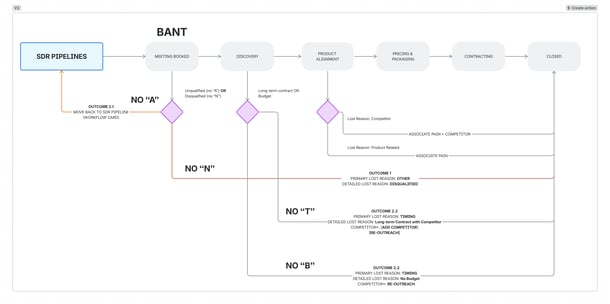
OUTCOME 1 — DISQUALIFIED (deal closed, not credited to SDR)
An AE may only disqualify on the following grounds:
|
Primary Lost Reason |
Secondary Lost Reason |
Description |
Dependent fields |
|
Operational Error |
Lead Disqualified |
- The prospect showed no genuine intention to evaluate Factorial — from the very beginning of the call - The prospect explicitly stated they were pressured by the SDR to attend and had no interest - The prospect needs a product category Factorial will never cover (e.g. full ERP) |
Detailed Closed Lost Reasons |
|
Internal Error |
- This deal was created by mistake from an automation or due to an internal process error |
OUTCOME 2 — UNQUALIFIED: BACK TO SDR PIPELINE (deal stays open)
Wrong Authority: Right company, right problem, but the wrong person attended the meeting.
- The deal returns to the SDR pipeline to find the right contact.
When the demo meeting was a no show:
- The deal returns to the SDR pipeline to be rescheduled.
After 5 minutes
- The SDR calls the prospect directly. If the SDR is unavailable, the AE calls.
- The SDR or AE sends a waiting message: "Hi [Name], we are in the meeting room waiting for you. Here is the link to join: [Link]. If you are unable to make it, please reply and we will find a time to reschedule."
After 15 minutes — official no-show
- The AE uses the Send back to SDR button on the Disqualify Lead card on the deal record. This moves the deal back to To Reschedule in the SDR pipeline it originally came from — Inbound or Outbound.
- The AE adds a note to the deal confirming the no-show.
- The calendar invite must not be deleted.
If the prospect confirms they want to reschedule
- The SDR is responsible for booking the new meeting
- The original deal record is kept — no duplicate deals should be create
OUTCOME 3 — CLOSED LOST DUE TO TIMING
Qualify first and then Close Lost with a Reengagement Date
|
Primary Lost Reason |
Secondary Lost Reason |
Description |
Dependent fields |
|
|
Timing |
Other Priorities |
Need exists but the project is deprioritized due to other internal initiatives. |
Reengagement Date |
Detailed Closed Lost Reasons |
|
Bad Financial Situation |
The company's financial situation prevents any new software investment. |
Reengagement Date |
||
|
Long-term Contract with Competitor |
Prospect is locked into a competitor contract for 8+ more months; would otherwise consider Factorial. |
Reengagement Date |
||
|
No Budget |
Interest and fit, but no budget allocated this cycle (company otherwise healthy). |
Reengagement Date |
||
- This is a Demo Held for the SDR — the opportunity is credited.
- The deal moves to Discovery: the AE works to create urgency and accelerate the timeline using all available tools.
- If the AE cannot convert: close as Closed Lost — Unqualified by Timeline, logging the prospect's contract end date so the deal re-enters the SDR qualification flow at the right moment.
- TLs check urgency from the AE side to decide whether to assign to the same AE or a new one in the future.
- Outcome: If not converted, it closes with a reactivation date — the opportunity is never lost, only deferred.
OUTCOME 4 — DEMO HELD (valid SDR opportunity, credited)
All other outcomes — including cases where budget is unclear, timing is vague, or a feature is missing — are Demo Held. The SDR is credited.
2. Close Lost Reasons & Disqualification / Disputes
These reasons can only be used to Close Lost a deal after Discovery Stage.
|
Primary Lost Reason |
Secondary Lost Reason |
Description |
|
Reputation |
Lack of local Presence |
Prospect requires a vendor with local offices or support in their market. |
|
Negative Review |
Prospect declined based on negative reviews or references about Factorial (specify Review Source). |
|
|
Legal |
No Local Entity |
Factorial lacks a legal entity or required legal/compliance coverage in the prospect's country (T&Cs, DPA, data localization). |
|
Contractual Limitation |
Legal or contractual disagreement we can't resolve (e.g. missing or unacceptable clause). |
|
|
Payment terms |
Payment terms required by the customer are not feasible for Factorial. |
|
|
SLA |
The service level agreement we can offer is not sufficient for the prospect. |
|
|
Competitor |
Current Price Conditions |
Competitor has undercut our pricing in a way we can't compete with. |
|
Long-term Conditions |
The competitor offers better long-term contract conditions than us, usually in the form of keeping the discount in a multi-year contract. |
|
|
Standalone solution offering |
Competitor offers standalone modules, while ours require the core bundle. |
|
|
Product Related |
Prospect prefers the competitor's product overall (it is not about a single blocking feature — use Product Limitation for that). |
|
|
Product |
Product Limitation |
A feature crucial for the prospect is not covered by Factorial and blocks the deal. |
|
In-house Development |
Prospect builds or keeps an internally developed solution instead of buying. |
|
|
Not Digitilized |
Prospect doesn't see enough value in digitalizing their workforce operations. |
Disqualification process
If the AE believes a demo does not meet the qualification standard, the following steps apply. Neither team has unilateral authority to close or credit a disputed deal.
How to submit a Disqualification on Hubspot — Disqualify Lead card
Instead of manually closing deals, AEs use the Disqualify Lead card on the deal record. If the meeting is held and the deal stage is not updated, there will be the “LAST STAGE UPDATE ISSUE” tag that appears on the deal until the stage is updated.
AE submits the disqualification within 3 business days of the demo using the Disqualify Lead sidebar card on the deal record. If the window is missed, the deal cannot be disqualified using this button.
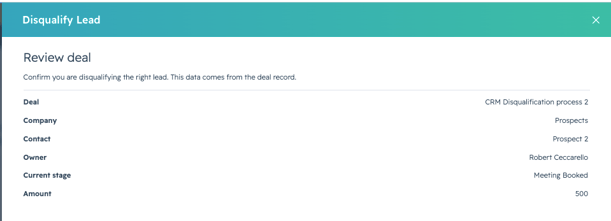
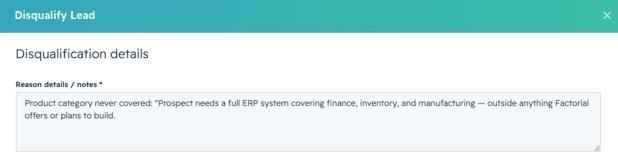
The card opens a three-step flow:
- Click Disqualify Lead — review the deal details
- Reason — select the disqualification reason, and add an after-demo date.
- Confirm — submit. The deal moves to Closed Lost automatically, the closed-lost reason fields are set, and a note is added to the deal record.
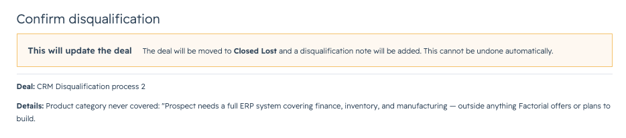
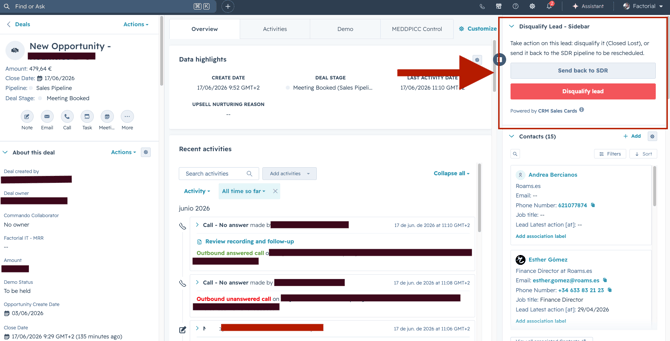
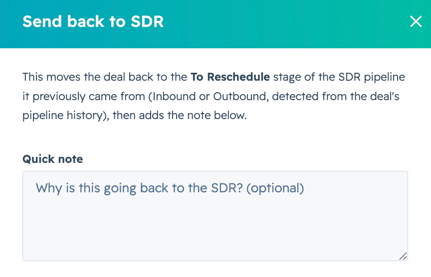
!! The same card has a Send back to SDR button, which moves the deal to To Reschedule in the SDR pipeline it originally came from — Inbound or Outbound. This button is used for no-shows or wrong authority cases. Timing-based closures go through the Disqualify Lead flow with the appropriate timing reason and a Reengagement Date set."
How to submit Timing Related Unqualifications on Hubspot:
If the deal needs to be unqualified due to one of the timing reasons mentioned under “Valid Disqualification Reasons”, the steps to follow are as below:
- Put the deal to the Discovery stage first.
- Move the deal to Closed Lost.
- Select the disqualification reason “timing”, and add a “reengagement date”.
- Confirm — submit. The deal moves to Closed Lost with a reengagement date to be moved back to the SDR pipeline at the right moment.
Contesting a Disqualification
Once a deal is Closed Lost, the deal record shows a Contest Disqualification section. SDR TLs can contest on behalf of the SDR:
- TL clicks Contest Claim on the Closed Lost deal record.
- TL writes the reason and submits.
- The deal moves back to To Reschedule in the original SDR pipeline and a note is added for the AE.
TLs have 7 days from the disqualification to contest. After 7 days the option is no longer available.